IDPA 5×5 Classification Calculator: Know Your Classification Before You Leave the Range
You just ran the IDPA 5×5 Classifier. Your RO calls your string times, you reload and fire again, and somewhere in the back of your mind you are doing rough mental math, was that fast enough for Master? By the time you drive home, you have already talked yourself into a result that may or may not be accurate.
Classification should not be a guessing game. Knowing exactly where you stand, right at the range, while the strings are still fresh, is the kind of feedback that sharpens your training focus and keeps you honest. That is why we built the SDA IDPA 5×5 Classification Calculator: a free, mobile-first tool that calculates your IDPA classification on the spot, shows you a full score breakdown, and even generates a shareable scorecard.
In this article we walk you through exactly how to use it.
What Is the IDPA 5×5 Classifier?
The IDPA 5×5 Classifier is the official classification course of fire used by the International Defensive Pistol Association to assign and update shooter classifications. It is designed to be a quick, standardized snapshot of your practical shooting ability.
The entire course is fired at 10 yards from a single position (P1), using 25 rounds across four strings:
- String 1: Draw and fire 5 shots freestyle
- String 2: Draw and fire 5 shots strong hand only
- String 3: Start with 5 rounds loaded — draw and fire 5, perform an emergency reload, then fire 5 more shots freestyle (10 rounds total)
- String 4: Draw and fire 4 shots to the body and 1 shot to the head, freestyle
Scoring is Limited: every point down adds 0.5 seconds to your raw string time. Penalties stack on top, a Procedural costs you 3.0 seconds, a Miss costs 2.5 seconds, a Hit on a Non-Threat or a Failure to Neutralize each cost 5.0 seconds. Your final score is the sum of all four string times plus all penalties.
Classifications range from Novice (NV) at the entry level up through Marksman (MM), Sharpshooter (SS), Expert (EX), and Master (MA) at the top. Each IDPA division has its own time thresholds, which means a Master time in Carry Optics (CO) is different from a Master time in Back Up Gun (BUG).
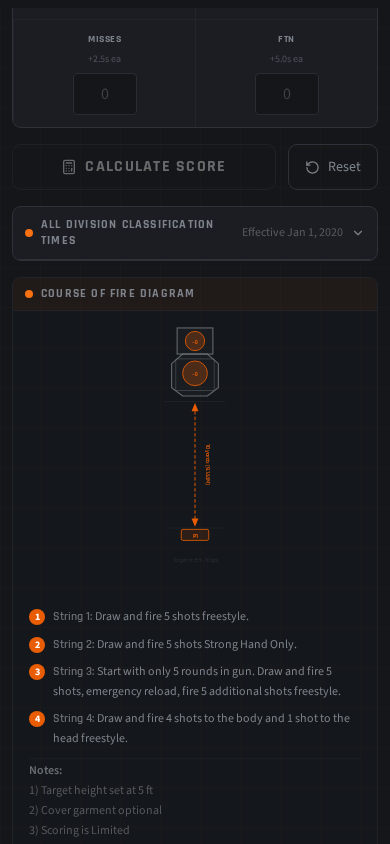
Our calculator includes a built-in course of fire diagram that illustrates the target shape, 10-yard distance, and P1 shooter position, a handy reference if you are running the classifier during a club match or informal practice session and want a quick visual reminder of the setup.
Introducing the SDA IDPA 5×5 Classification Calculator
The SDA IDPA 5×5 Classification Calculator is a free tool available directly at strategicdefenseacademy.com. No app download. No account. Open it on your phone at the range and it is ready to go.
We built it for one reason: the official IDPA 5×5 scoring math is simple in theory but surprisingly easy to get wrong under range conditions. You are juggling four string times, points down from multiple strings, and potentially multiple penalty types — all while your RO is reading numbers aloud and your squad is waiting. A dedicated tool eliminates the arithmetic errors and gives you a definitive result in seconds.
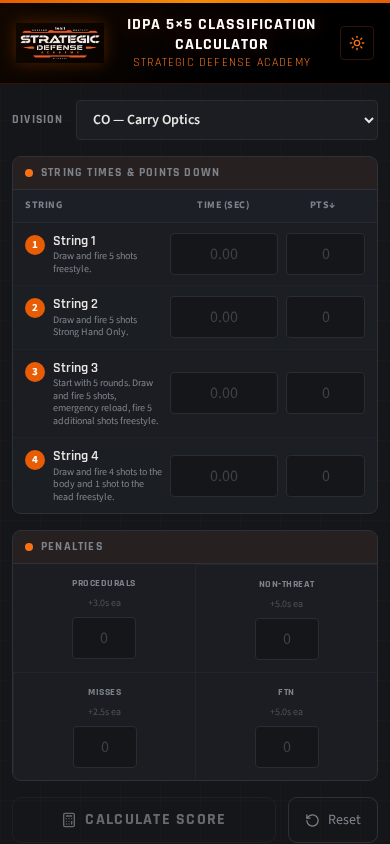
The tool supports all eight IDPA divisions, CDP, ESP, CO, SSP, CCP, REV, BUG, and PCC, and defaults to Carry Optics (CO) in dark mode, which is easy on the eyes outdoors. It displays your classification, a full score breakdown, and tells you exactly how many seconds faster you need to shoot to reach the next classification tier.
Step-by-Step: How to Use the Calculator
Step 1: Select Your Division
At the top of the calculator you will find a division selector. Tap it and choose your division, CDP (Custom Defensive Pistol), ESP (Enhanced Service Pistol), CO (Carry Optics), SSP (Stock Service Pistol), CCP (Compact Carry Pistol), REV (Revolver), BUG (Back Up Gun), or PCC (Pistol Caliber Carbine). Each division has its own classification time thresholds, so this selection directly affects your result.
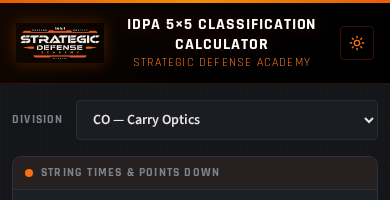
If you are shooting a classifier across multiple divisions, you can change the division and recalculate without re-entering your times, just make sure you tap Calculate Score again after switching.
Step 2: Enter Your String Times
The calculator shows four string fields, one for each string of fire. Enter the raw string time your RO called for each string, the time as recorded by the shot timer, before any points-down additions. Use decimal format (for example, 8.43).
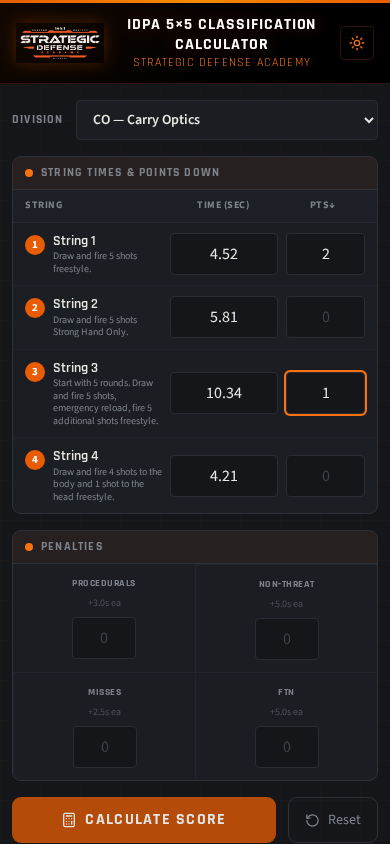
Each string also has a Points Down field next to the time. Enter the total points down for that string, your RO or scorer will give you this number. The calculator automatically converts points down to seconds (0.5s per point) as part of the score calculation.
Step 3: Enter Any Penalties
Below the string fields you will find a dedicated Penalties section, always visible so nothing gets overlooked. Enter the total count for each penalty type you received across the entire course of fire:
- Procedurals: +3.0 seconds each
- Hit Non-Threat: +5.0 seconds each
- Misses: +2.5 seconds each
- Failure to Neutralize (FTN): +5.0 seconds each
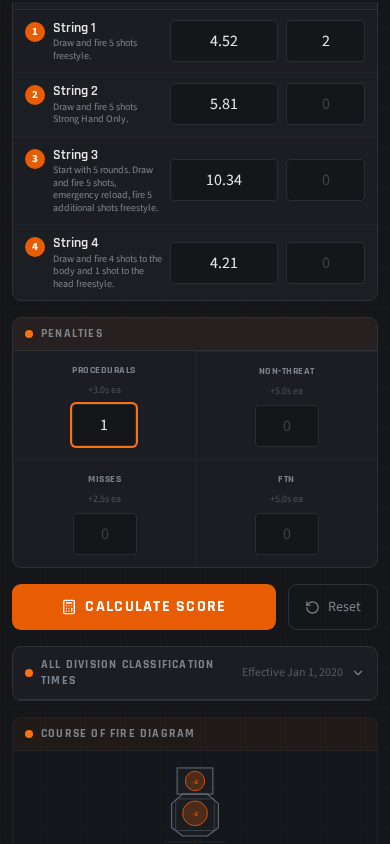
Most clean runs will have zeros across the board here. But if your emergency reload on String 3 did not seat properly and you took a Procedural, this is where it gets counted. Do not skip this section, penalties can shift your classification by a full tier.
Step 4: Tap Calculate Score
The calculator is intentionally not live, it does not update as you type. This lets you enter all your data without accidentally reading a partial result mid-entry. Once all four strings and penalties are filled in, tap the Calculate Score button. Your results appear immediately below.
Step 5: Read Your Results
The results section shows you everything at once:
- Your final score in seconds
- Your IDPA classification — MA, EX, SS, MM, or NV — for your selected division
- A per-string breakdown showing each string’s raw time, points-down addition, and adjusted time
- A penalty breakdown showing the total time added from each penalty category
- How many seconds faster you need to shoot to reach the next classification tier
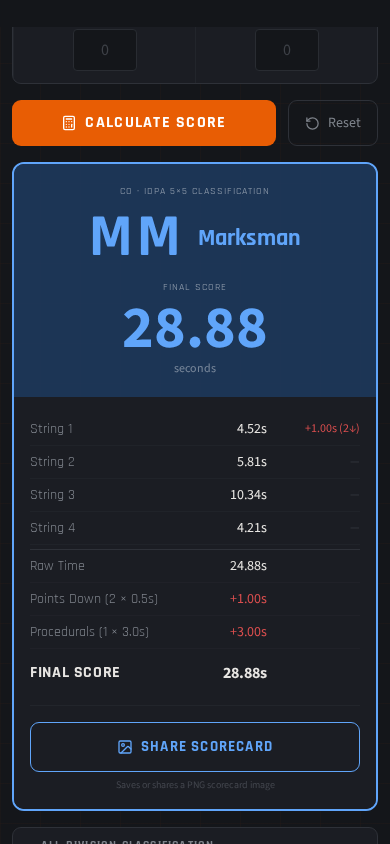
That last data point — the gap to the next tier — is one of the most useful numbers in the tool. If you are 1.8 seconds away from Expert, you have a concrete, measurable training goal. That is far more actionable than simply knowing you shot Sharpshooter.
Step 6: Share Your Scorecard
Once you have your results, tap the Share Scorecard button. The tool generates a clean PNG image of your complete scorecard, division, score, classification, and breakdown, that you can share directly to WhatsApp, text it to your squad, or post to social media. It is a clean, professional-looking image that represents your result at a glance.
Use it to track your progress over time, celebrate a new classification, or share with a training partner who ran the same classifier so you can compare strings.
Reading the Division Reference Table
Below the calculator you will find a collapsible Division Reference Table that shows the time thresholds for all five classifications (MA, EX, SS, MM, NV) across all eight IDPA divisions. Tap it to expand.
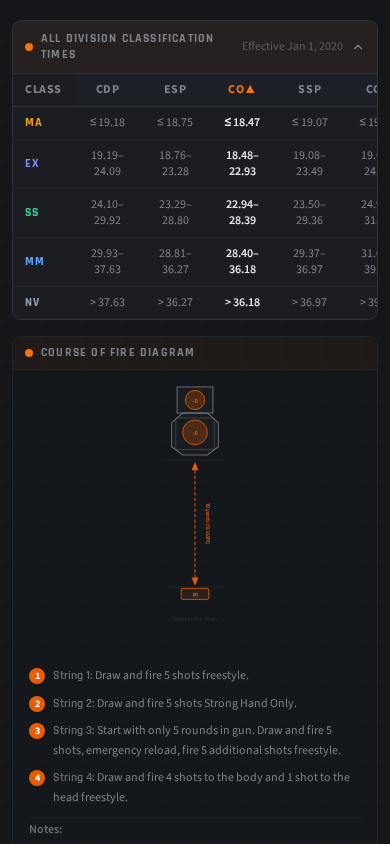
This table is useful in two ways. First, it gives you context, if you shoot Carry Optics primarily but are curious how your time would classify in SSP or ESP, a quick glance answers that question without running a separate calculation. Second, it helps you set realistic goals before a match. If you are currently a Sharpshooter in CO, the table shows you exactly what the Expert threshold is, so you can build a training plan around a specific number rather than a vague aspiration.
For reference, here are the CO division thresholds:
- Master (MA): 18.47 seconds or faster
- Expert (EX): 18.48 – 22.93 seconds
- Sharpshooter (SS): 22.94 – 28.39 seconds
- Marksman (MM): 28.40 – 36.18 seconds
- Novice (NV): Above 36.18 seconds
Every division has different thresholds, REV and BUG, for example, have more generous windows reflecting the mechanical limitations of those platforms. The reference table makes it easy to see the full picture across all eight divisions at once.
Tips for Using It at the Range
The calculator is designed to be used at the range, not reconstructed from memory in your car afterward. Here is how to get the most out of it during a live classifier run:
- Open it before your first string. Have the division selected and the screen ready before you step to the line. You want to be entering numbers as your RO calls them, not fumbling with the app while the next shooter is setting up.
- Enter times as your RO calls them. After each string, quickly enter the time and points down while they are fresh. If your club records scores on a paper scorecard, you can also enter everything at once at the end, the non-live design supports both workflows.
- Use Reset between practice runs. The Reset button clears all fields and returns the calculator to a blank state. If you are running the classifier multiple times in a practice session, hit Reset after each run to start clean, do not overwrite a previous result without reviewing it first.
- Share the PNG to your squad group chat. After a classifier at a club match, sharing your scorecard PNG to your squad’s WhatsApp or Signal group is a great way to keep the conversation going and create a record of where everyone stood on a given day.
- Use the gap-to-next-tier number as a drill target. If the calculator tells you that you need 2.3 more seconds to reach the next tier, go back to dry fire with that specific number as your goal. Work the draw on String 1. Work the strong-hand strings. Make the deficit specific and addressable.
Run It, Then Come Train With Us
The IDPA 5×5 Classification Calculator is one part of a larger training picture. Knowing your classification is valuable. Understanding why you are where you are — and what fundamentals need work to move up — is where real progress happens.
At Strategic Defense Academy, we work with shooters at every classification level, from Novice competitors building their first consistent draw to Expert shooters grinding toward Master. Our instruction focuses on the same fundamentals the 5×5 tests: draw speed, accuracy under time pressure, strong-hand proficiency, reloads, and shot placement under stress.
Run the classifier. Get your number. Then come train with us and let’s close the gap together.